

How parcel monitoring helps ecommerce sellers and suppliers catch shipping exceptions before customers do.
It is Monday morning, and the first customer email has already arrived:
“My order shipped on Friday. Why hasn’t the tracking information changed?”
The support agent opens the carrier’s tracking page. It shows only one event: Label Created.
There is no pickup scan. No package movement. No clear answer.
The package may have left the fulfillment center and missed its first scan. Or it may still be sitting near the loading dock after missing Friday’s pickup.
Customer Service contacts Operations. Operations contacts the warehouse. Someone searches through handoff records and internal messages while the customer waits.
For many ecommerce businesses, this is the blind spot that begins after an order is marked shipped.
What is parcel monitoring?
Parcel monitoring tracks outbound packages after a shipping label is created and identifies shipments that may require attention.
Instead of asking teams to check every tracking number manually, it helps them focus on questions such as:
- Did the carrier receive the package?
- Has the shipment stopped moving?
- Did the carrier report a delivery exception?
- Did the shipment meet the requested ship date?
- Who is responsible for investigating the problem?
The goal is not to watch every package. It is to find the packages that need action.
Why “Shipped” does not tell the whole story
In most order workflows, a shipment is marked shipped after the warehouse creates a label and sends the tracking number to the sales channel.
But label creation and carrier acceptance are separate events.
Between those two moments:
- The warehouse may create a label without handing off the package.
- The carrier may collect the package but miss the first scan.
- A scheduled UPS or FedEx pickup may not happen.
- The label may be created after the retailer or marketplace’s requested ship date.
From the OMS or sales channel, every one of these orders may still appear as shipped.
The problem often remains hidden until the customer asks for an update, the delivery becomes overdue, or a retailer’s shipping compliance metric is affected.
That can lead to more than an extra support ticket. It may result in replacement shipments, refunds, negative reviews, and channel compliance risk.
According to Gorgias, “Where is my order?”—often called WISMO—can represent 30% to 50% of customer service tickets for some ecommerce brands. When shipment information is spread across carrier websites, the OMS, email, and spreadsheets, agents repeatedly spend time reconstructing the same story.
What if your team found the package first?
With Synctify Parcel Monitoring, the Friday shipment does not have to wait for a customer complaint to receive attention.
Synctify connects with UPS and FedEx through APIs to retrieve the latest available carrier events.
When a shipment has been marked shipped but has no accepted first carrier scan after its expected pickup window, Parcel Monitoring can surface it as No Scan.
Instead of discovering the problem several days later, the team can see the shipment in its action queue during the next warehouse-local morning review.
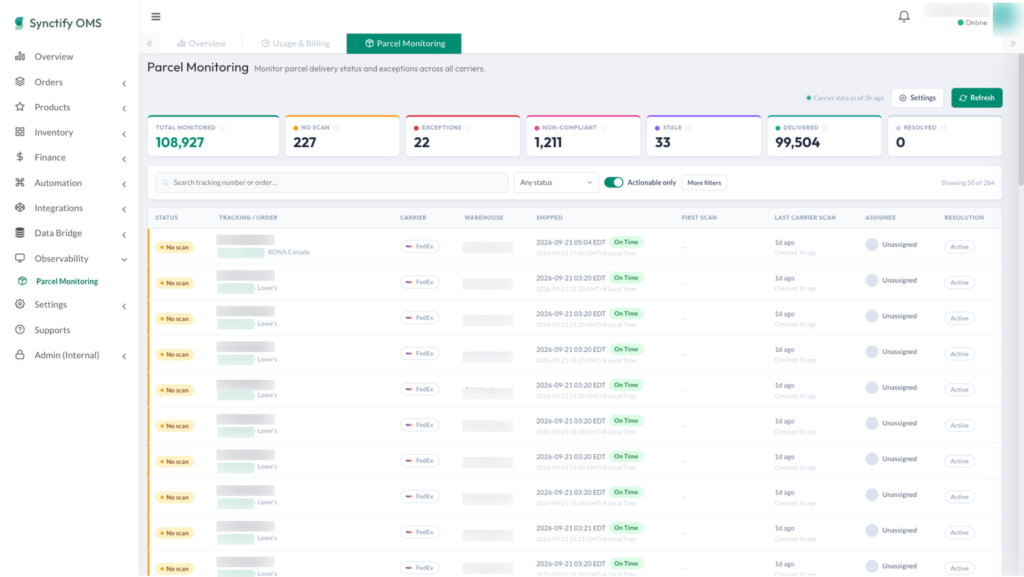
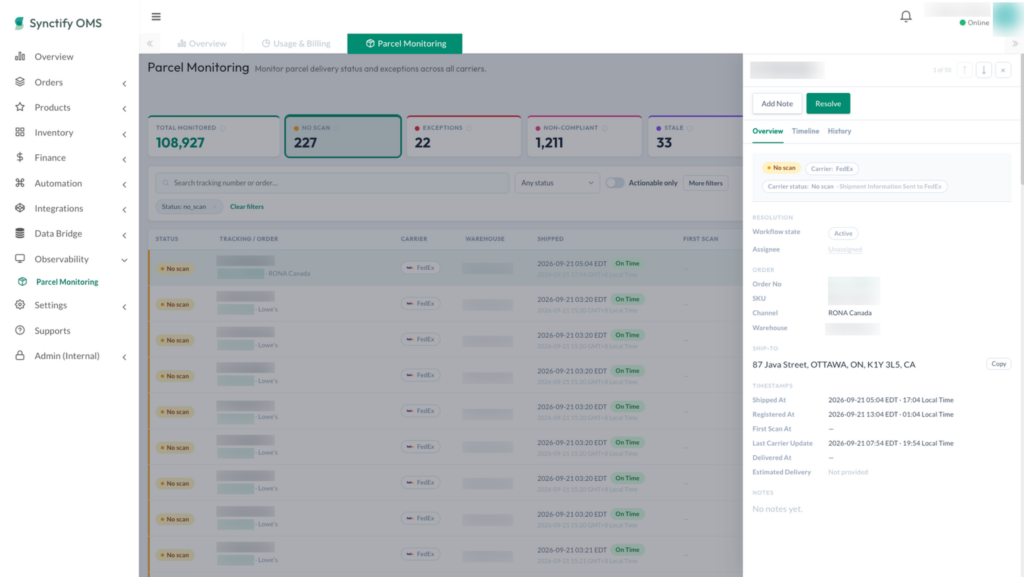
Opening the record shows the context needed to investigate:
- Order and tracking number
- Sales channel and fulfillment warehouse
- Carrier and shipped time
- First-scan status
- Latest available carrier event
- Assigned owner and internal notes
The team can begin investigating without first switching among multiple systems.
From shipping exception to clear next step
The operations manager assigns the shipment to the team member responsible for warehouse coordination and adds a note:
“Confirming Friday’s UPS pickup and warehouse handoff.”
The warehouse later confirms that the package missed the scheduled pickup and is still in the shipping area. The team arranges the next handoff and decides whether the customer should receive an update.
After the issue is handled, the owner records the outcome and marks the item Resolved.
The entire workflow stays with the tracking record: what happened, who investigated it, what action was taken, and whether the issue remains open.
Customer Service no longer has to search through email threads for an answer. Operations does not need to maintain a separate exception spreadsheet.
Resolving an item closes the team’s internal workflow without changing the carrier’s tracking status.
Parcel Monitoring also does not automatically contact customers, issue refunds, or create replacement orders. Those decisions remain under the seller or supplier’s control.
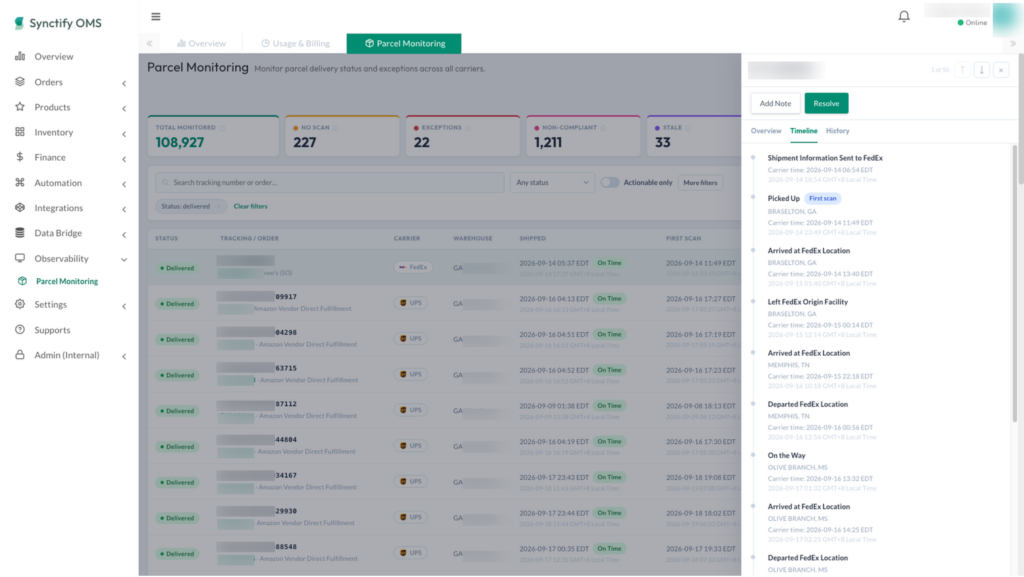
Which shipments need attention?
A missing first scan is only one type of post-shipment risk.
Parcel Monitoring also helps teams identify:
- Carrier exceptions, including delivery failures, lost or undeliverable packages, and returns
- Stale shipments that remain without a first carrier scan for an extended period
- Ship-date non-compliance when a shipment misses the requested ship date under the channel’s applicable rules
Synctify monitors each eligible tracking number independently. If one order contains multiple packages, one may be delivered while another still requires attention.
Over time, these records can also reveal recurring fulfillment problems. Repeated No Scan shipments from one warehouse may indicate a handoff issue. Frequent delivery failures with one carrier may point to carrier performance or address-quality problems.
What begins as one delayed package can become evidence for improving the wider fulfillment operation.
Turn shipment visibility into action
Basic tracking answers:
“Where is the package?”
Operations teams need to know:
“Which packages are not progressing normally?”
“Who owns the next step?”
“Has the problem been resolved?”
Synctify Parcel Monitoring helps ecommerce sellers and suppliers identify post-shipment problems earlier, review carrier events with the relevant order context, coordinate follow-up, and preserve a clear record of each resolution.
Because a better delivery experience is not only about answering “Where is my order?” faster.
It is about discovering that a package may never have left the warehouse—before the customer has to ask.
👉 Book a demo to see how Synctify Parcel Monitoring can help your team manage shipping exceptions before they become customer problems.
Frequently Asked Questions
blog-your-order-says-shipped
No Scan means a shipment has been marked shipped but has not received an accepted first carrier scan after its expected pickup window. It may indicate a missed pickup, warehouse handoff problem, or missing carrier scan.
No. Parcel Monitoring helps internal Operations and Customer Service teams identify and manage shipping issues. Customer communication, refunds, replacements, cancellations, and returns remain under the merchant’s control.
Subscribe to Our Newsletter
Get the latest releases, news and more!