

Why Vendor Central success is built on data integrity (PO Acknowledgement, shipping labels, tracking, and shipment confirmation)—not just shipping boxes
If you sell on Amazon Vendor Central (1P), it’s easy to assume operational success means “we shipped the order.” In reality, Amazon evaluates fulfillment through a chain of system events and documents: Purchase Order (PO) receipt → PO Acknowledgement (ACK) → shipping label/package data → shipment confirmation + tracking → settlement and reconciliation.
When that chain breaks—even if the parcel physically ships—you’ll feel it downstream: delayed visibility, customer service escalations, reconciliation pain, and potentially disputes. This post is Part 1 of a 3-part series. Here we’ll cover:
- The Vendor Central “three-flow” mental model (documents, physical shipping, money)
- What Direct Fulfillment (DF) really is in Vendor Central
- The end-to-end DF workflow, common failure points, and how to design a workflow that scales
Vendor Central Operations: Think in Three Flows (Documents, Physical, Money)
In Vendor Central, you’re managing three flows at once—and they’re tightly coupled:
1. Document Flow
PO → ACK →(DF: Label / Shipment Confirmation / Tracking) → Settlement / Reconciliation
2. Physical Flow
Pick → Pack → Label → Tender to carrier → Delivery
3. Money Flow
Settlement → Deductions / Chargebacks → Disputes
Here’s the key: physical shipment is not“complete” until the document flow accurately represents it. Amazon’s systems rely on your acknowledgements and confirmations to power customer communications, tracking visibility, and financial reconciliation.
Direct Fulfillment (DF) vs Retail Procurement (RP): Two Different Worlds
Vendor Central contains multiple fulfillment models, but two dominate operations:
- Direct Fulfillment (DF): You ship directly to the end customer (drop-ship style), and Amazon requires timely, accurate acknowledgements and shipment data.
- Retail Procurement (RP): You ship into Amazon’s network (FCs), with additional steps like ASN, appointments, receiving, invoicing, and disputes.
This post focuses on Direct Fulfillment (DF). Part 2 will break down Retail Procurement (RP) and explain why Collect vs Prepaid changes the workflow dramatically.
Direct Fulfillment (DF) End-to-End Workflow (What Actually Matters)
The biggest DF misconception: it’s not just “ship fast.” DF is fundamentally about package-level data integrity across systems (Vendor Central, WMS/3PL, and carriers).
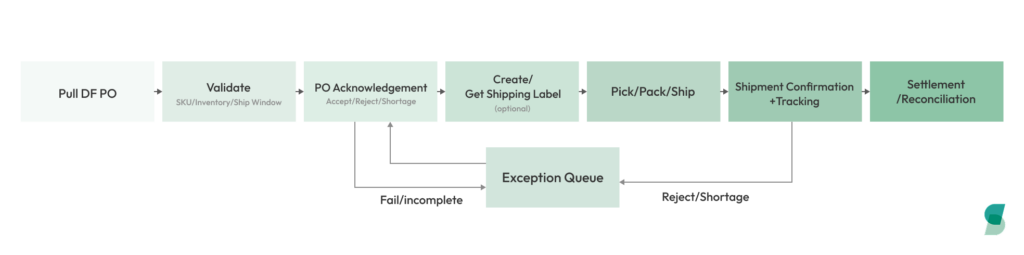
Step 1: Receive the DF Purchase Order (PO)
When a DF PO arrives, your first step shouldn’t be “send to the warehouse.” It should be validation:
- Is the SKU mapping consistent across your ERP/WMS/3PL and Amazon?
- Do you have inventory available within the ship window?
- Will this order require splits/partials (which increases downstream data complexity)?
A mature DF operation converts the PO into an executable fulfillment task with clear routing rules (e.g., multi-warehouse logic).
Step 2: Submit PO Acknowledgement (ACK)
PO Acknowledgement is the first “hard gate” in DF. It’s not a formality—it’s status synchronization:
- Accept vs reject
- Confirm quantities (including partials if applicable)
- Provide reason codes where required
Common failure patterns:
- ACK is late or missing → Amazon’s order state becomes unreliable
- ACK says “yes,” but fulfillment later changes → reconciliation and disputes get messy
A scalable approach is rules-driven ACK: auto-accept when inventory and constraints are met; route exceptions to a queue.
Step 3: Create/Get Shipping Labels (Package-Level Lock-In)
In DF, a shipping label isn’t just paper—it binds carrier/service, package count, weight/dimensions, and delivery address to the order at the package level.
This is where many teams get burned operationally:
- Re-boxing / re-printing labels
- Merging or splitting packages
- Updating weights/dimensions late
Result: Vendor Central, WMS/3PL, and the carrier all tell different stories, and tracking or confirmations fail or become inconsistent.
Step 4: Pick, Pack, Ship (Physical Execution Must Produce Usable Events)
The physical steps (pick/pack/tender) only “count” if they create reliable events you can report:
- Actual ship date/time
- Carrier + service
- Tracking numbers per package
- Package-level contents and identifiers (as required)
Batch-delayed tracking feeds (e.g., “we get tracking from the 3PL once per day”) create visibility gaps that increase customer service risk and operational firefighting.
Step 5: Shipment Confirmation + Tracking (The DF Close-the-Loop Moment)
Shipment confirmation and tracking updates are the DF closing loop. Amazon relies on this data for:
- Customer tracking visibility
- Delivery performance measurement
- Settlement and reconciliation logic
Common issues:
- Tracking isn’t available when you confirm shipment
- Partial shipments are not represented correctly
- Confirmation fails and nobody retries until it’s “too late”
A scalable DF workflow includes monitoring + retries + an exception queue—so failures become managed work, not surprises.
Step 6: Settlement and Reconciliation (Ops and Finance Share the Same Data Chain)
Many Vendor teams treat DF as “done” once the box leaves the dock. Finance often disagrees at month-end.
The truth: every upstream DF event becomes downstream finance evidence. When ACK + label + tracking + shipment confirmations are consistent and complete, reconciliation is dramatically easier.
DF Workflow
Key Takeaways and What to Automate First
If you want DF to scale, focus on three areas:
- Rules-driven PO Acknowledgement (auto-accept vs exception routing)
- Package-level data integrity (labels, tracking, and system-of-record consistency)
- Reliable confirmation operations (monitoring, retries, and exception queues)
Next in the series: Retail Procurement (RP). We’ll break down the end-to-end workflow and explain why Collect vs Prepaid changes routing, ASN, appointment scheduling, and receiving—plus which points trigger the most downstream deductions and disputes.
Subscribe to Our Newsletter
Get the latest releases, news and more!